Open Payment Page > Analytics.
Form analytics (Pro)#
The report covers the last 30 days.
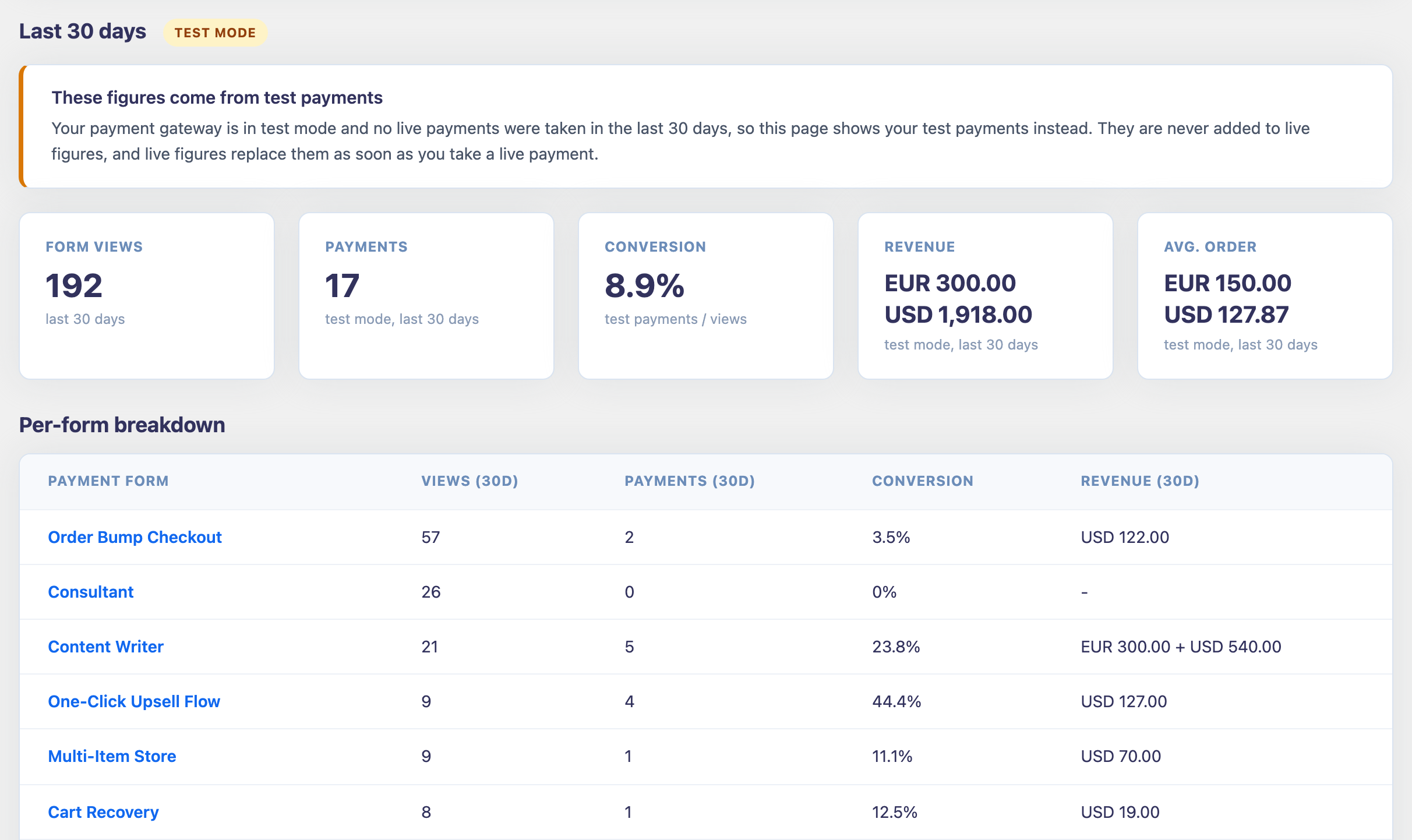
The cards at the top total every form:
- Form views: how many times visitors loaded your forms. Your own views while logged in don't count.
- Payments: completed orders.
- Conversion: payments divided by views.
- Revenue: money taken, per currency.
- Avg. order: revenue divided by payments, per currency.
Per-form breakdown shows views, payments, conversion and revenue for each form, so you can see which forms sell and which need work.
How the numbers are counted:
- Only paid payments count. Live and test payments are never mixed. While your site is in test mode and has no live payments yet, the report shows your test payments, marked Test mode, so you can check your setup. The first live payment switches it to live figures.
- Order bumps and products are part of the order's revenue. An accepted one-click upsell adds revenue but is not counted as another payment.
- Each currency is totaled on its own. Amounts in different currencies are never added together.
- Form views are counted from the day you installed or updated to a version with Analytics. Until 30 days have passed, conversion counts only the payments made since that day, and the report says so.
On the free plan#
The free plan shows the Payment Page platform fees you've paid: roughly 2% of the live Stripe payments processed through your forms. The full form analytics come with Pro.